
Install WPLocation Free from WordPress.org, configure a current country database and test your first geolocation rule. Pro and add-ons extend this one Free foundation.
One Free plugin
Start on WordPress.org.
Install WPLocation Free from your WordPress dashboard. Free downloads and updates come from WordPress.org; Pro and add-ons come from WPLocation.
Your geolocation-rule foundation.
Set post, page and category audiences, use the Country visibility block and shortcodes, and check the private country source in Diagnostics.
Install WPLocation FreeNo paid WPLocation license. Published Free requires WordPress 6.8+ and PHP 7.4+. Pro requires PHP 8.3+ and stays installed alongside Free.
Local lookups require a current licensed GeoLite2 Country database. Setup and legacy upgrade guide →
Before you start
- Free requires WordPress 6.8+ and PHP 7.4+. Pro requires PHP 8.3+.
- Back up and test on staging, especially when replacing an older standalone build.
- Have a current licensed GeoLite2 Country database or your own MaxMind account ready. No database is bundled.
Install and activate Free
- Open Plugins → Add Plugin in WordPress and search for WPLocation.
- Choose WPLocation – Geolocation and Country Rules by Jazib Zaman, then select Install Now → Activate.
- Alternatively, get the ZIP from WordPress.org and use Plugins → Add Plugin → Upload Plugin.
- Open WPLocation → Settings. Free needs no paid WPLocation key.
Configure country detection
Open WPLocation → Settings and choose one of these paths:
Use WPLocation → Diagnostics to confirm a readable GeoLite2-Country source, review its build date and test a public IP address you are permitted to test. Resolve source errors before relying on a country rule.
Automatic database updates are opt in. After checking the source, enable Enable daily database update checks in Settings if wanted, then Save update settings. WP-Cron needs site traffic or a configured server cron.
Create and test a first rule
- Create and save a test page in WordPress.
- Open WPLocation → Pages, find the page and select its title.
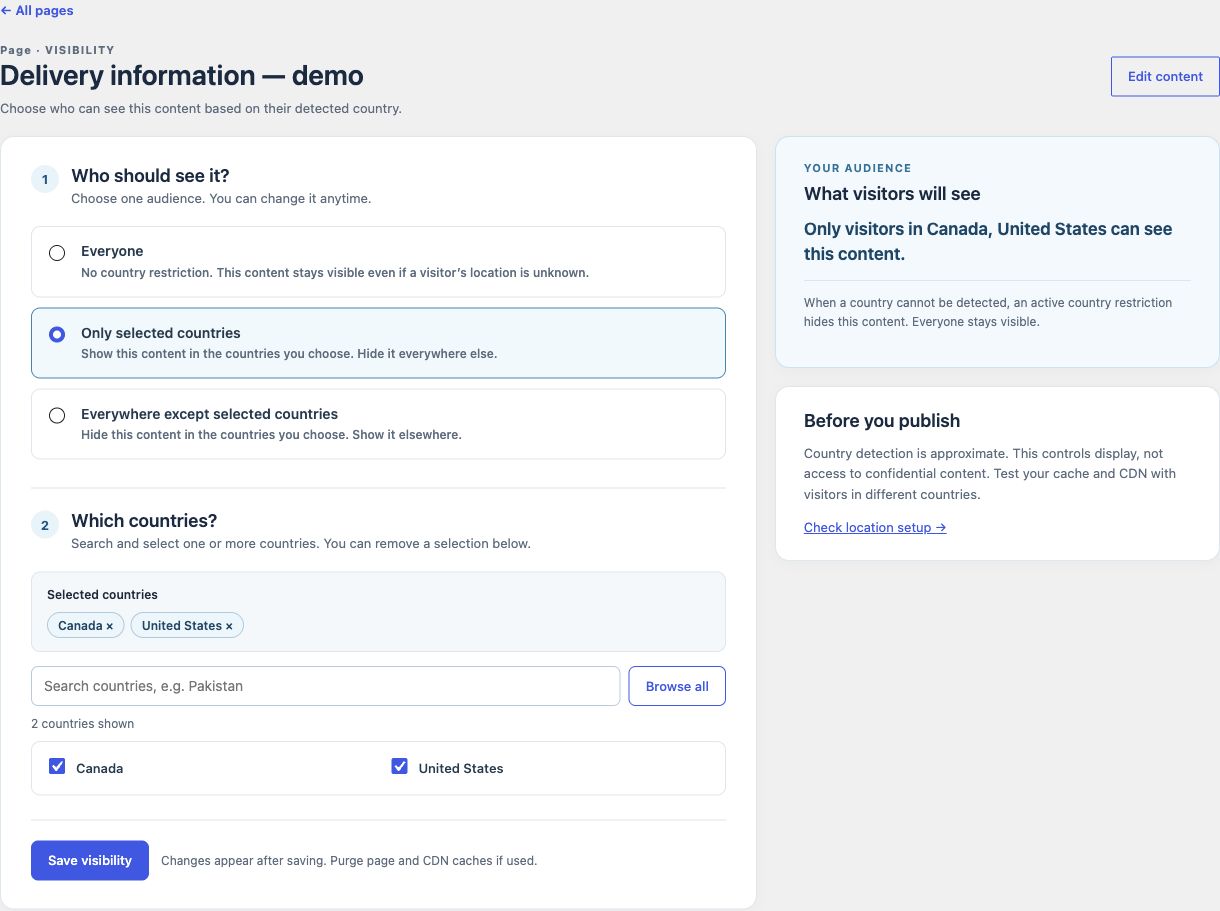
- Choose Only selected countries or Everywhere except selected countries. Select at least one country and review the audience summary.
- Select Save visibility. Under Check the saved result, choose one allowed country and one denied country.
- To remove the restriction, choose Everyone and save. The current editor requires at least one country for a restricted audience; do not use a blank selection as a setup step.
Check caching and unknown locations
Purge your page and CDN caches, then test the public URL from an allowed and denied location. Repeat the requests after the cache has been populated. A saved-rule test checks the rule; it does not prove that the public cache serves the right result.
Unknown countries are hidden by an active restriction. A blocked singular Free page or post returns your theme’s 404 response. Unrestricted content remains available. IP location is approximate and cannot secure confidential information.
Follow the cache checklist and troubleshooting steps if the public result differs.
Keep Free current
Free downloads and updates come from WordPress.org. There is one Free plugin. Pro and add-on downloads come from your WPLocation account or their documented product page. Read the changelog and back up before updating.
Add Pro when your store needs it
For WooCommerce product and product-category audiences, install Pro as a second plugin and keep Free active. Follow Pro installation and licensing. For content-only work, continue with page rules, the Country visibility block or shortcodes.
Upgrade Free safely
There is one Free plugin, installed and updated through WordPress.org. The WordPress.org plugin includes the applicable improvements from the retired website build. Keep Free active with Pro 1.4.5 or newer.
- Back up the database, plugins and country rules. Test the update on staging first; on multisite, prepare each site separately.
- Confirm your current licensed GeoLite2 Country MMDB is readable outside both the public web root and the plugin folder. If the old standalone plugin stores its only database inside the plugin folder, prepare a current private database before replacing it. WordPress removes that folder during updates; obsolete bundled data is not copied or restored.
- Save the private path in WPLocation → Settings when available, or have your administrator define
WPLOCATION_GEOIP_DB_PATHinwp-config.phpfor the new release. That constant takes priority. Never put a database, credentials or private server path into a support post. - Update WPLocation through Dashboard → Updates. Open WPLocation → Overview, check the source status, then run a private lookup in Diagnostics.
- Check an allowed country, a denied country and an unknown location. Clear your page/CDN cache and test actual delivery.
Saved rules, content and private database options are retained. Standard post and text-widget rendering translates old markup to without registering the old unprefixed tag or rewriting posts. Escaped examples stay unchanged; another plugin that owns that tag keeps ownership. Review custom fields, page builders and direct do_shortcode() integrations separately.
If the country source is missing, restricted output stays hidden. Restore or configure a current licensed private source in Settings, check Diagnostics and purge caches. Free does not bundle location data or require a paid WPLocation key.
Search visibility, sitemaps and caching
Free 1.1.11 makes WordPress core sitemap URL lists independent of the visitor requesting XML, including their pagination. Real page and REST requests still respect country rules: a whole-page rule may return a 404 to a crawler outside the audience. A sitemap entry does not guarantee indexing.
Keep essential general information public and use the visibility block or prefixed shortcode for regional sections. WPLocation does not create translations, regional URLs, hreflang tags or ranking guarantees.
Shared-cache protection remains enabled because blocks, shortcodes, secondary queries and Pro can personalize a response. A CDN or page cache may run before WordPress. Bypass personalized HTML or use a separately validated country-aware configuration; clear caches after changes and test allowed, denied and unknown locations. Do not disable protection just because the main page has no audience.
Update Free through WordPress.org, keep it active with Pro, and follow the private database precautions above. Read the release notes →
Contact WPLocation with your software versions and the result you expected. Keep keys and customer data private.