
This guide applies to Free 1.1.0. See the installation and legacy upgrade guide.
Post rules let you target one article without changing every post in its category. They are useful for local announcements, region-specific editorial content, and a single-country campaign.
Choose the post
Open WPLocation → Posts, search for the article, and select its title. If you are still drafting the article, save it in WordPress first so it appears in the list.
Configure and save the rule
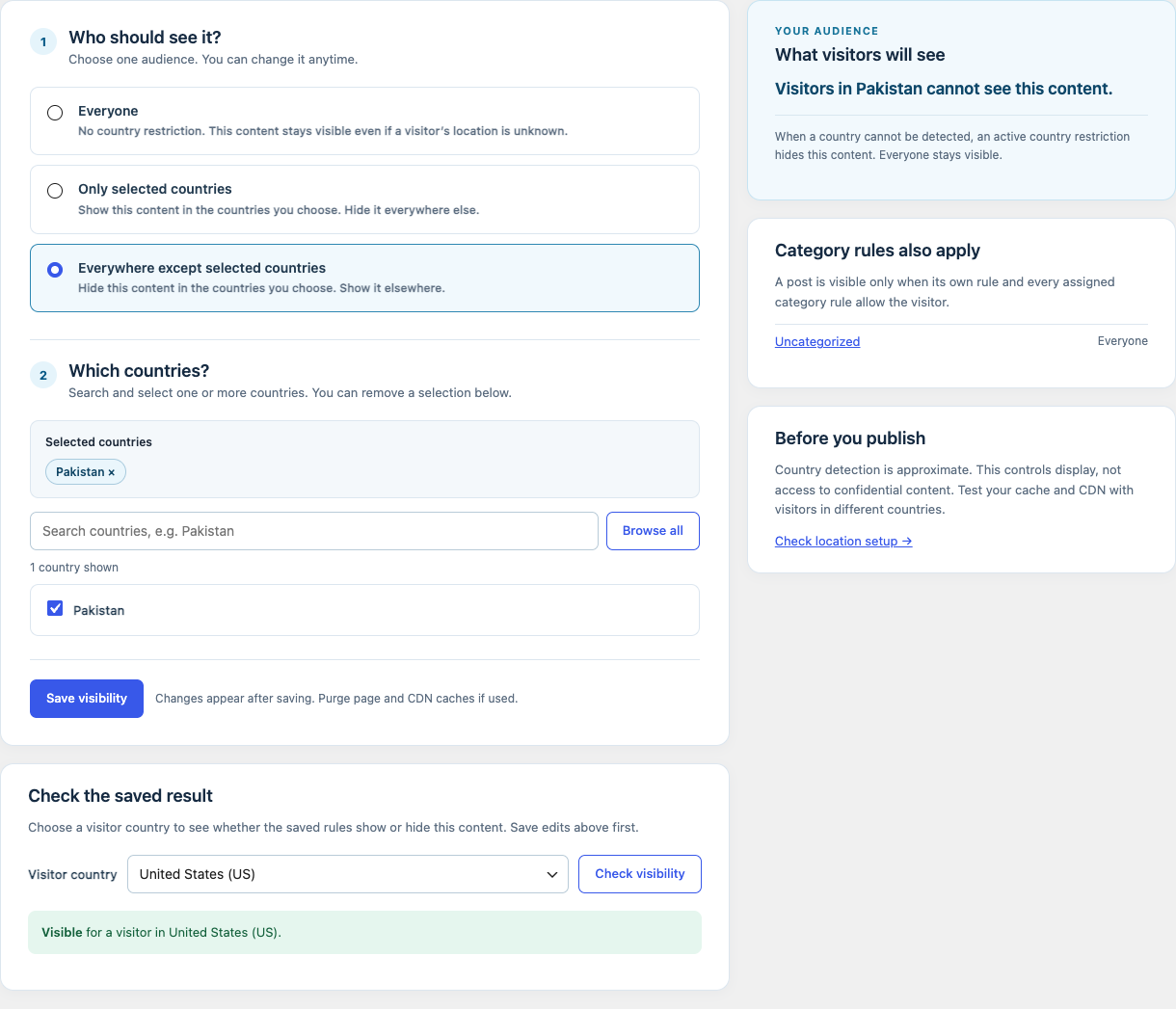
Choose Everyone, Only selected countries, or Everywhere except selected countries. For a restricted audience, search and select at least one country. Read the live summary, then save. The panel beside the editor shows any assigned category rules, which can restrict the post further.
Test allowed and blocked countries
Choose a visitor country under Check the saved result. The result includes this post’s saved rule and all assigned category rules. Save changes first, then verify the public post after purging caches. A blocked singular post is returned as a 404; the visitor’s country may be unknown if the local database is missing or cannot identify the IP.
Choose the right scope
Use a category rule for a group of posts, a page rule for a complete page, or shortcode content for one part of a post. WPLocation rules personalize display; they do not replace editorial review or access security.
Contact WPLocation with your software versions and the result you expected. Keep keys and customer data private.