
This guide applies to Free 1.1.0. See the installation and legacy upgrade guide.
Use a page rule when a complete WordPress page should be available only in certain countries, or hidden in certain countries. If only one section should vary, use a shortcode instead.
Open the page rule
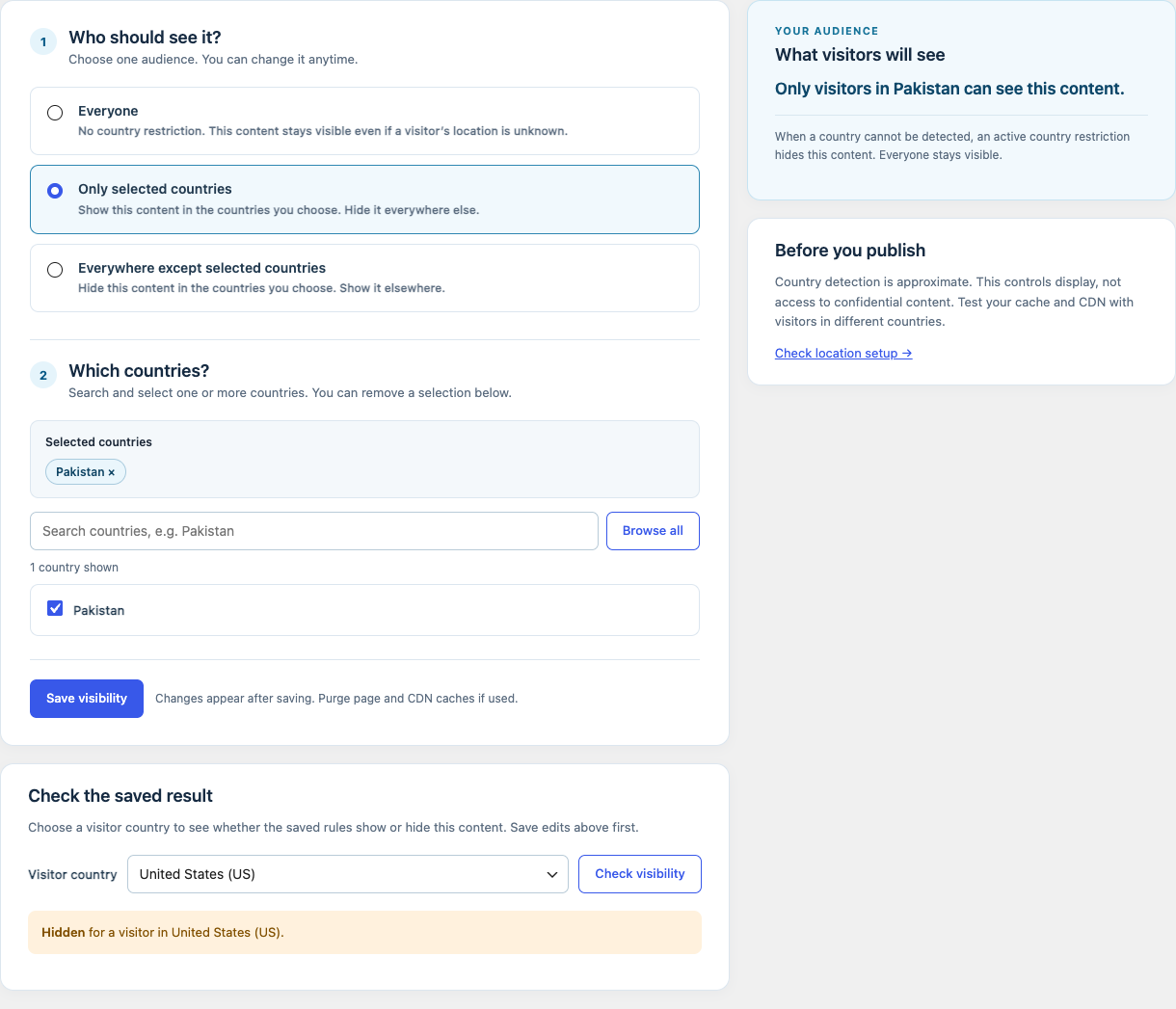
Go to WPLocation → Pages, search for the page, and select it. The rule editor offers Everyone, Only selected countries, and Everywhere except selected countries. A live summary explains the audience.
Set the audience
Choose Everyone to leave the page unrestricted. For either restricted audience, search and select at least one country, review the summary, and save. Unknown visitor countries are hidden when a restriction is active.
Test before sharing the page
Choose a visitor country under Check the saved result. Test an allowed country and a blocked country. A blocked request to a page with an active rule is served as a 404 by the current Free plugin. An unknown visitor country is also hidden when the rule is active.
Review links and caches
Review navigation and internal links that point to the page; a visible link can still lead to a blocked page. Purge page and CDN caches after changes, then verify the public URL from your normal environment. Country detection is approximate and should not protect sensitive material.
Contact WPLocation with your software versions and the result you expected. Keep keys and customer data private.